 Segue
SegueThe whole set on one screen
The order, the cue points and a mixing note for every transition, ready to read before anything is written.

Segue orders your tracks, picks where to enter and leave each one, and writes the cues back into rekordbox.
The order, the cue points and a mixing note for every transition, ready to read before anything is written.
0 API keys
Segue calls the Claude Code command already on your Mac, so a set uses your own plan's usage.
Orders the set by energy, key and tempo with no Claude call at all.
Claude's picks are saved, so the set is the same every time you open it until you ask Claude again.
Claude cannot hear audio, so it chooses from rekordbox's own phrase analysis. Any pick that misses the phrase grid is thrown away and the default cue is kept.

Two curves show where the set climbs, peaks and breathes. Markers underneath flag the transitions that clash.

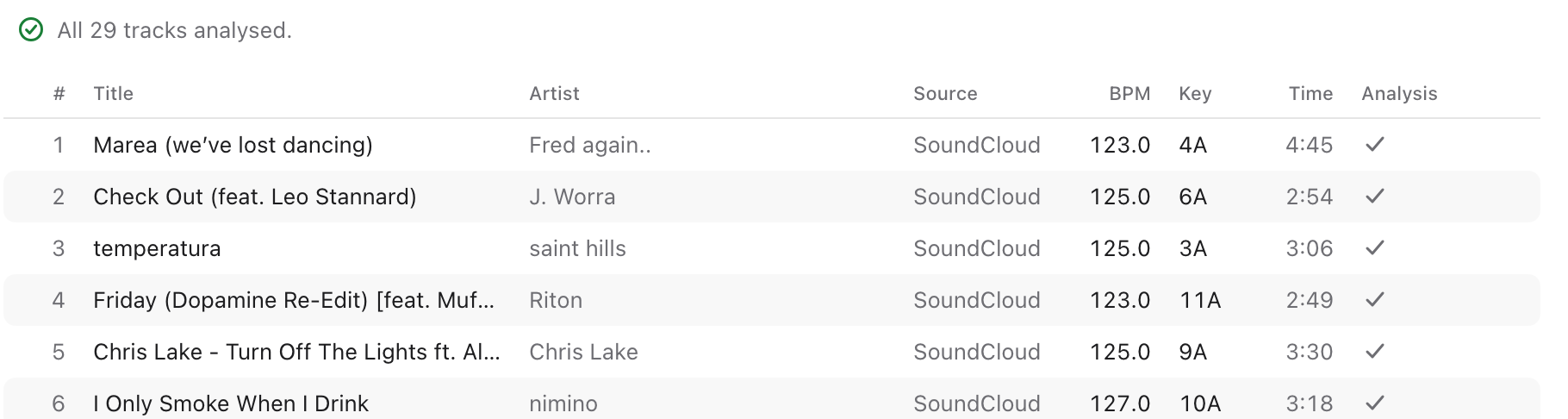
The Tracks view shows what still needs analysing across Spotify, SoundCloud and TIDAL tracks, then works through the list.
Pick a playlist from your rekordbox 7 library. Segue takes it from there and leaves the original alone.
rekordbox only analyses a Spotify track once it is loaded to a deck. Segue drives rekordbox's own shortcuts to load each unanalysed track in turn.
4 to 14 s per track
Claude gets each track's tempo, key, energy and phrase map, then returns an order with an in and out point for every track.
5 to 8 min for 50 tracks
Read the set before anything is written: energy and tempo curves, a rating for each transition, and a note on how to mix it.
smooth, OK or clash
One click writes the cues to each track and creates a new playlist in set order, named after the original with (arranged) on the end.
backup taken first
Segue writes to one place only, and it is careful about what it touches when it does.
A full copy of the library database is saved first, every time, and is never deleted automatically.
The set goes into a new playlist. The one you started from is not edited.
Only cues Segue wrote are ever replaced. Tracks that already have your cues get Segue's as memory cues instead of hot cues.
Claude receives titles, artists, tempo, key, energy and phrase maps. Spotify's public pages are read for track names. Nothing else is sent.
Worth knowing: Segue writes to rekordbox's library database in a way rekordbox does not support. Keep your own backup of your library as well.
Segue is a personal tool shared as source code. There is no installer. The build script sets up Python and creates Segue.app in the folder.
$git clone https://github.com/akashxn/Segue.git
$cd Segue && ./build_app.sh
Then double-click Segue.app. The README covers permissions, restoring a backup and the known limitations.